For: Everyone · Time: about 3 minutes
You need: the Vacation extension and an approver
Requests let people ask for something that needs approval: time off for themselves, or a person to work on a project. Everything is tracked on the Requests page.
Request vacation
- Go to Requests and click the request button with the suitcase icon. You can also use Request Vacation in the booking window on the scheduler.
- Choose Vacation days or Time off in lieu days. Your available balance is shown.
- Choose Single day or More than 1 day, set the dates, and set the allocation.
- Check the Approvers. Your default approver is filled in automatically; add others if needed.
- Add an optional Note and click Request.
Request a resource
If you can't book someone directly, or your team uses approvals for bookings, request them instead.
- On the scheduler, drag across the person's row to select the dates and click the selection. You can also use the Request button on the scheduler toolbar.
- Set the allocation and choose the project.
- Click Request (instead of Schedule). The booking appears as a request until it's approved.
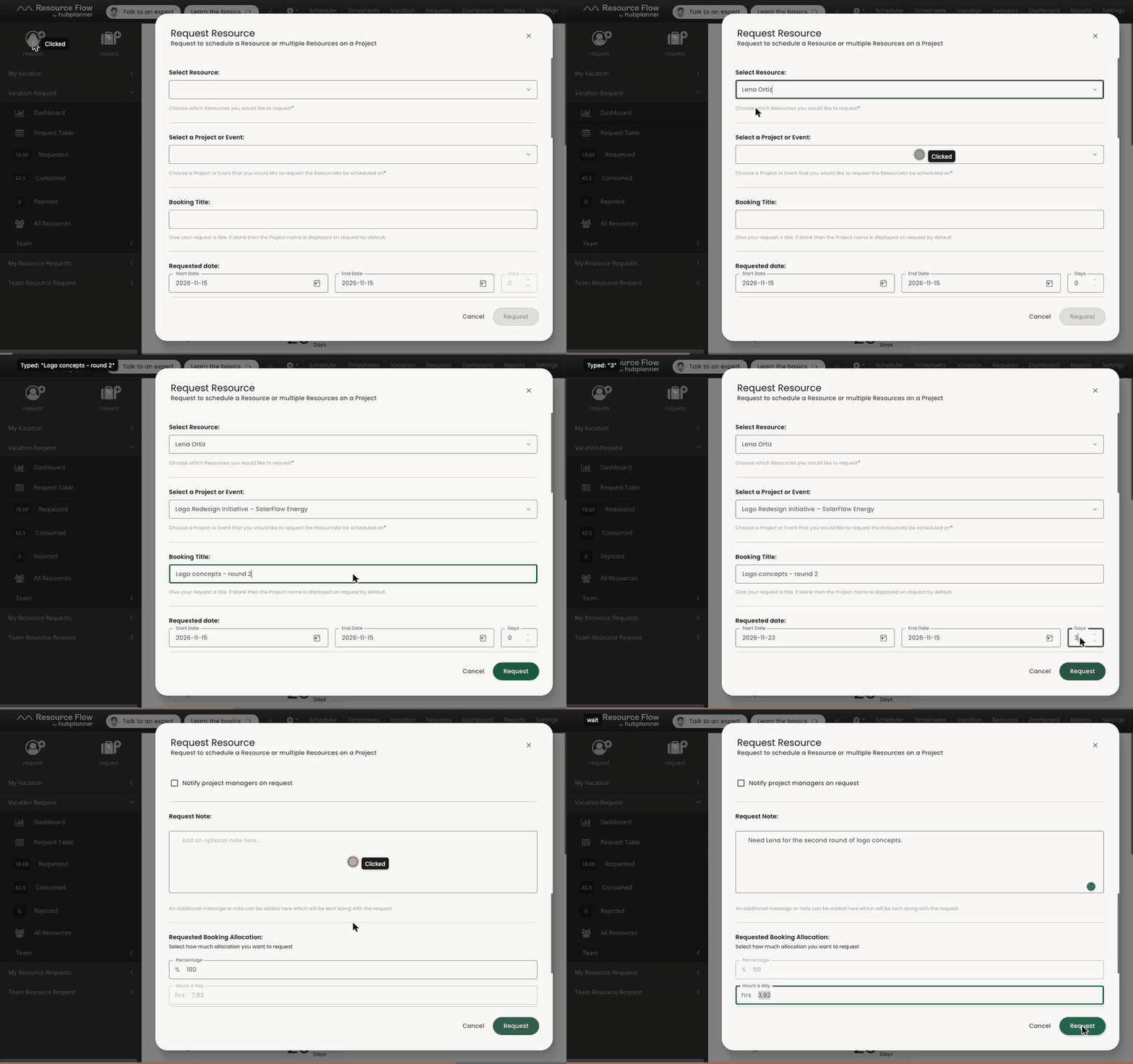
Filling in a resource request
Track your requests
The Requests sidebar has a section for each type:
| Section | What's in it |
|---|---|
| My Vacation | Your dashboard plus requested, consumed and rejected time off |
| Vacation Request | Vacation requests waiting for you to approve (approvers only) |
| My Resource Requests | Resource requests you've made: requested, approved and rejected |
| Team Resource Request | Resource requests from your team waiting for approval |
Approve or reject a request
Approvers can approve or reject from the Requests page, from the scheduler, or straight from the notification email. The person who asked gets an email whenever the status changes (pending, approved or rejected).
For admins: choose who approves whose requests in Settings → Manage → Manage Approvers. Add an approver, then assign the people or resource groups they approve for.
? Tip: Turn request emails on or off in Settings → My Notifications.
Related articles
Was this article helpful?
That’s Great!
Thank you for your feedback
Sorry! We couldn't be helpful
Thank you for your feedback
Feedback sent
We appreciate your effort and will try to fix the article