For: Everyone · Time: about 3 minutes
You need: the TOIL extension switched on
TOIL lets people earn time off when they work more than their normal hours, then take it back later like vacation. Resource Flow works it out automatically from timesheets.
How TOIL is earned
When someone reports more time than their daily capacity, the extra hours above the policy's threshold become TOIL. You can see your TOIL balance on your timesheet and on the Requests → My Vacation dashboard.
Take TOIL
- Go to Requests and click the request (suitcase) button, or use Request Vacation on the scheduler.
- Under Request days using, choose Time off in lieu days. The number of hours you have available is shown next to it.
- Choose Single day or More than 1 day and set the dates.
- Set the allocation (a percentage, hours a day or total hours), check the approver, and add an optional note.
- Click Request. Your approver is notified and the request shows as pending until they approve it.
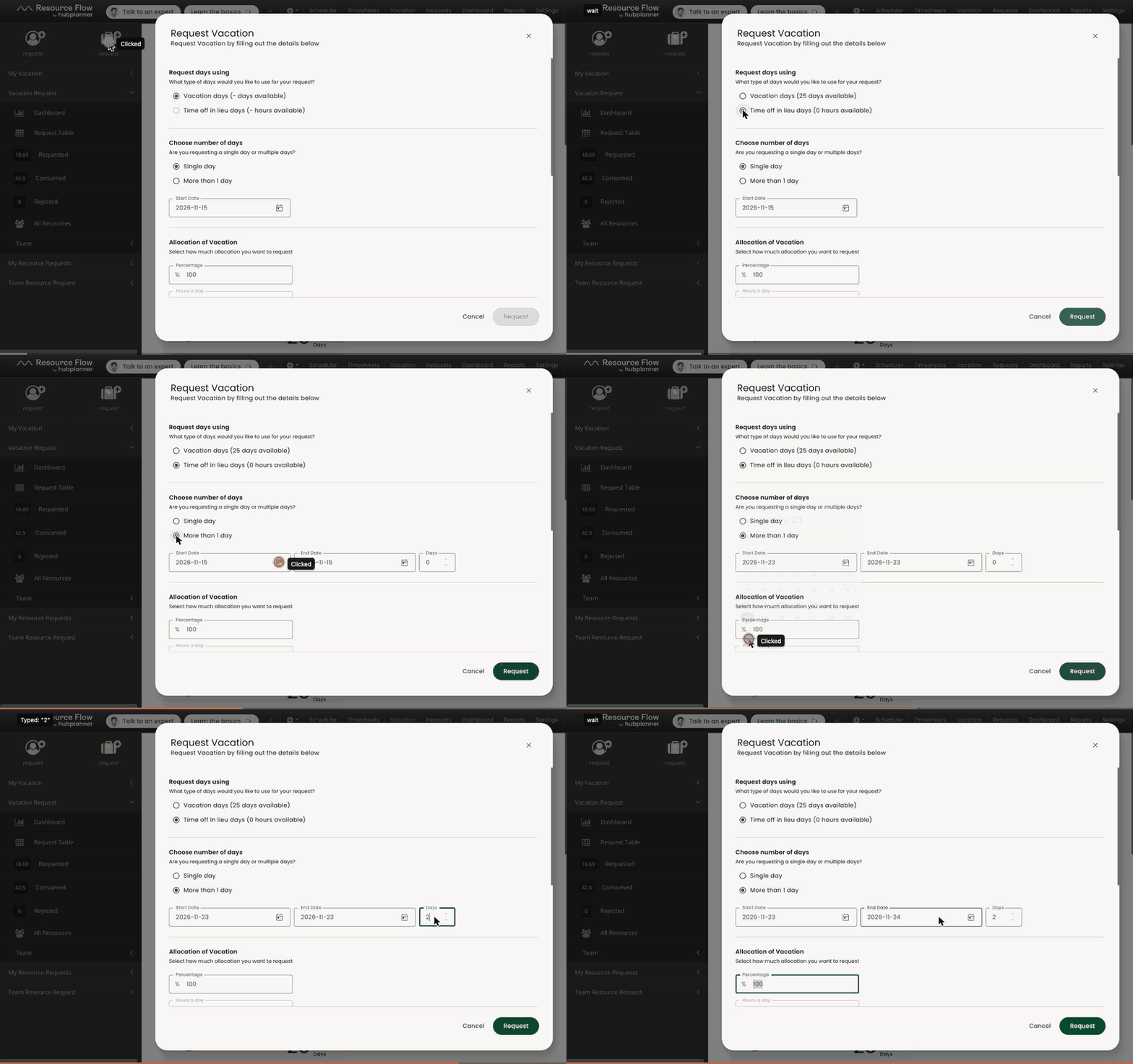
Requesting two days of TOIL
For admins: set up TOIL
- Install the extension from Settings → Add / Remove Extensions → Time off in lieu (TOIL).
- Open Settings → Time Off In Lieu (TOIL) and create a policy.
- Choose which timesheet statuses count (for example, only Approved time).
- Set the threshold (extra time over capacity before TOIL starts), the accrual multiplier (1 by default), an optional daily limit, the start date and the expiry (none or annual).
- To correct someone's balance, edit the resource and go to Vacation & Toil → Add adjustment.
? Tip: Count only Approved time if you want a manager to confirm overtime before it turns into TOIL.
FAQ: Can I report on TOIL?
Yes. In the Report Builder, choose a Resource report and add the TOIL columns: accrued, consumed, remaining and requested.
Related articles
Was this article helpful?
That’s Great!
Thank you for your feedback
Sorry! We couldn't be helpful
Thank you for your feedback
Feedback sent
We appreciate your effort and will try to fix the article