Upcoming changes in Project Flow
At Milient, we continuously enhance Project Flow by Moment to make your daily work simpler, faster, and more efficient.
Whats changed:
Faster report loading
Why?
To make a better and more reliable experience in reports
What's changed?
Reports across Moment now load and render faster, with more reliable pagination, sorting and grouping. Print and PDF output for large reports is more consistent too.
Where to find it?
Available in all reports across Project Flow.
Invoice export shows currency totals
Why?
To display the currency used in the project
What's changed?
The invoice report export (PDF and Excel) now includes a total row with values by project currency.
Where to find it?
Reports › Invoice report › Export.
Whats new:
Add Multiple Team Members in One Step
What's new?
We've reintroduced the ability to add several co-workers to a project team at the same time, making project setup and team management much more efficient.
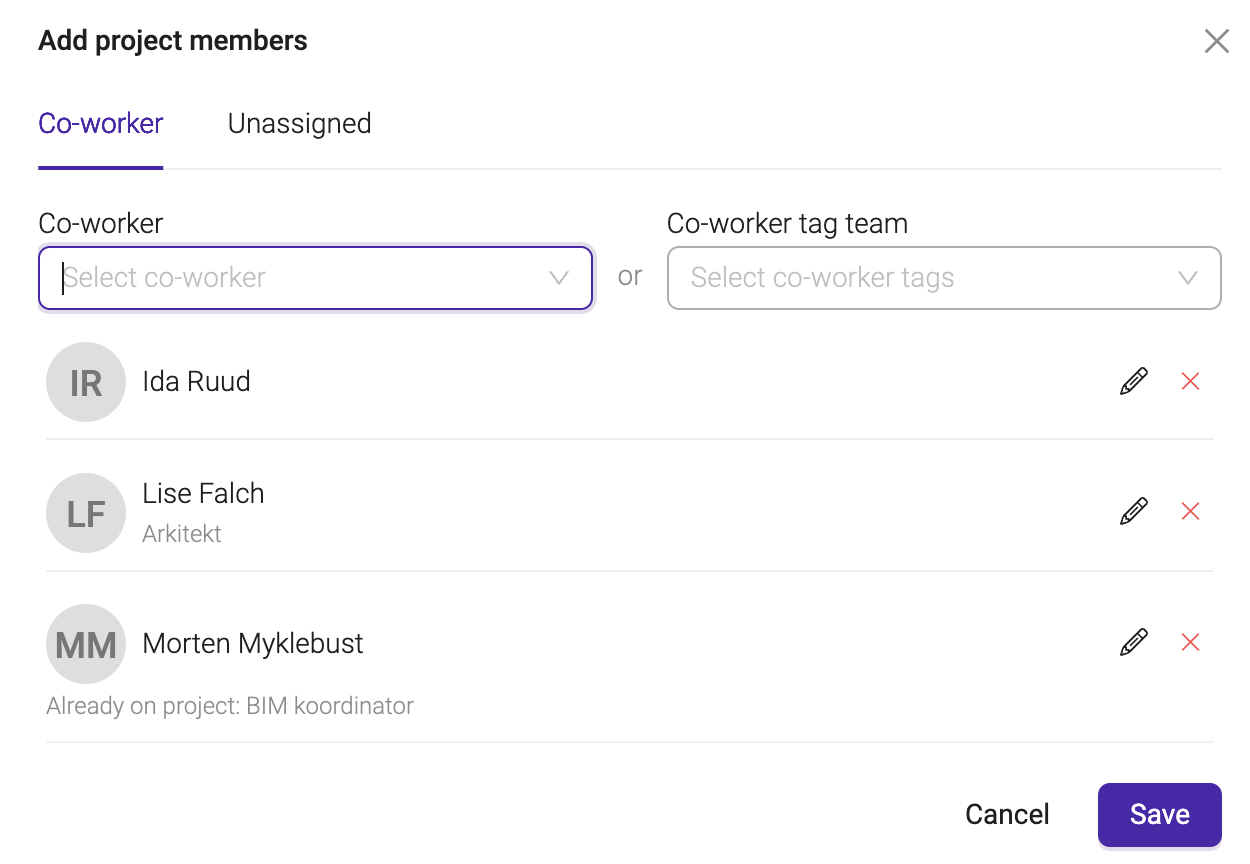
How does this benefit you?
- Add multiple team members in a single action
- Assign the same project role to all selected users
- Apply tags and activity memberships simultaneously
- Instantly see if someone is already part of the project team
Where to find it?
In all projects where you add team members.
Automatic status on activities
Why?
To be able to automate status based on time in your activities.
What's new?
Activities can now automatically update their status based on their start and end dates, when this option is turned on.
How does this benefit you?
- Saves you from manually updating status on activities as they progress.
- Keeps activity status consistent with your planned dates without extra clicks.
Where to find it?
Activity settings.
Bug Fixes:
#1020 - Project Status Translation
Issue: Project statuses were not always displayed in the correct language on the project profile page.
Fix: Status translations now display correctly.
#1572 - Sorting error in Offer and Nonconformities reports
Issue: Sorting by certain columns in the Offer report or the Nonconformities report returned an error instead of the sorted list.
Fix: Sorting now works correctly in both reports.
#1770 - Activity Report filters not staying saved
Issue: A saved Activity Report could lose its filter settings after the report was updated.
Fix: Saved Activity Reports now keep their filters as expected.
#1227 - Price list filter showing the wrong prices
Issue: Filtering a price list by active or inactive prices did not always show the correct results.
Fix: Price list filtering now shows active and inactive prices correctly.
#883 - Faroe Islands half-day holidays registered incorrectly
Issue: Half-day holidays in the Faroe Islands could be registered twice, or handled incorrectly, in time registration.
Fix: Faroe Islands half-day holidays are now calculated and registered correctly.
#963 - Invoice batch delete could time out
Issue: Deleting or reverting a batch of invoices could time out or get stuck.
Fix: Invoice batch delete and revert now complete reliably.
#971 - Project template settings not carried over
Issue: When creating a new project from a template, some of the template's settings were not copied to the new project.
Fix: Project settings from the template are now copied correctly.
#1687 - Issue with the 2FA resend-code flow
Issue: Requesting a new two-factor authentication code did not always behave as expected, and the on-screen instructions did not always match the chosen method.
Fix: The resend-code flow and instructions now work correctly for each authentication method.
#745 - Absence approver missing from reports
Issue: The approver for an absence was not always shown in reports.
Fix: The absence approver is now displayed again.
#1241 - Absence Report lock status not saved
Issue: A saved Absence Report did not remember its lock status.
Fix: Absence Reports now save their lock status correctly.
#962 - Nets import job could crash
Issue: The Nets OCR/CREMUL import job could crash when a transaction had no receiver company.
Fix: The import job now handles this case without crashing.
#1000 - Missing translation on the Capacity report
Issue: A dropdown label on the Capacity report was missing its translation.
Fix: The label is now translated correctly.
#988 - Couldn't adjust time records after the activity cap was exceeded
Issue: Once an activity's time cap was exceeded, existing time records for it could not be edited or reduced.
Fix: Existing time records can now be edited or reduced even after the cap is exceeded.
#989 - Timesheet Save button got stuck
Issue: After a timesheet save failed due to an over-limit error, the Save button could become unusable.
Fix: The Save button now remains usable after this type of error.
#1720 - Co-workers menu structure
Issue: The Co-workers menu items were not named or ordered as intended.
Fix: The menu naming and order have been corrected.
#1835 - Subscription warning message in the wrong language
Issue: A subscription warning message did not always follow your selected language.
Fix: The message now follows your selected language.
#1795 - Users added to a price list weren't visible
Issue: Users added to a price list were not shown as expected.
Fix: Users added to a price list are now visible correctly.
#1730 - Missing translations in a few places
Issue: Some labels in Project Plan, Add project members, and Approve overtime were missing translations.
Fix: These labels are now translated.
#935 - “Add new team member” modal translation
Issue: The “Add new team member” modal did not follow your selected language.
Fix: The modal is now translated correctly.
#881 - Invoice reference field translation
Issue: The default “our reference” text on invoices was not always translated correctly.
Fix: This text is now translated correctly.
#768 - Resource planner scrolling got stuck
Issue: Scrolling in the Resource planner could stop partway down the page when many resources were listed.
Fix: Scrolling now works smoothly regardless of how many resources are listed.
#892 - Unnecessary “unsaved changes” prompt
Issue: The confirm-exit prompt in user settings could appear even when nothing had changed.
Fix: The prompt now only appears when there are actual unsaved changes.
#940 - Default project role not applied
Issue: When adding a new team member to a project, the default project role was not always retrieved.
Fix: The default project role is now retrieved correctly.
#1649 - Partner-created projects not available for planning
Issue: Projects created by users from a partner company were not available for planning in Project Plan, for either the creator or the administrator.
Fix: These projects are now available for planning as expected.
Removed Functionality:
There are no removed features or functionalities in this release.
Was this article helpful?
That’s Great!
Thank you for your feedback
Sorry! We couldn't be helpful
Thank you for your feedback
Feedback sent
We appreciate your effort and will try to fix the article