What's improved this week
- Approve overtime with a single button
- Activity status is no longer overwritten by automatic updates
- Tidier report downloads, and large reports open faster
- Invoice dates and currency conversion follow your company setup
- Choose which Project Owner is sent to connected systems

Changes
Approve overtime with one button
Why? Approving overtime meant choosing between three options in a drop-down list.
What's changed? The drop-down is replaced by one button, "Approve selected overtime".
Whether the overtime is approved for payment, or as time off plus a supplement, now follows the "extra time" setting of the overtime category.
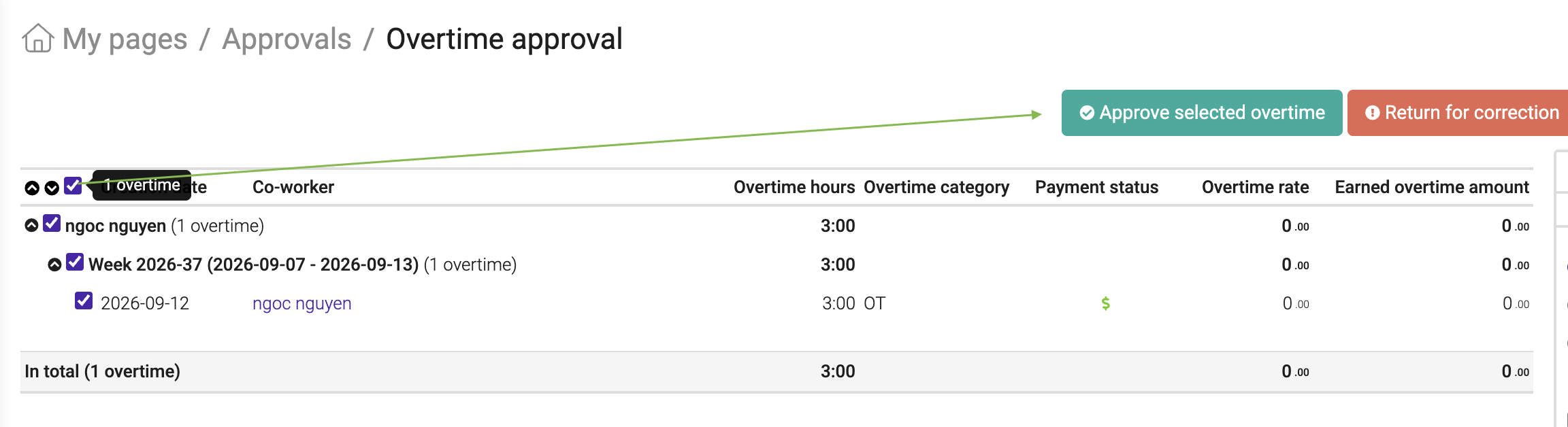
Where to find it? My pages > Approvals > Overtime approval
Activity status no longer changes by itself
Why? "Update status based on dates" could overwrite a status you had set yourself, and could change existing activities when you switched it on.
What's changed? Your own status changes are no longer overwritten, and existing activities stay as they are. All automatic changes are shown in the activity history, and you can turn them off for individual activities.
Where to find it? In the activity settings, under "Update status based on dates".
Clearer report downloads
Why? Some downloaded reports did not match what you see on screen, or were hard to read.
What's changed? Your downloaded reports now look more like what you see on screen. In the Project report, groups appear in the same order as on screen.
In the Hours report, Discount % now has two decimals and empty fields stay blank.
The Invoice report adds a space between thousands, and the Task report columns are now simply called “Project” and “Task”.
Where to find it? Available in all of these reports
Large reports open faster
Why? Reports with many rows used to load everything at once. This could feel slow, especially for larger companies.
What's changed? These reports now show one page at a time, so they open faster and are easier to scroll through.
Where to find it? Available in all reports across Project Flow.
Invoice dates follow your company's date format
Why? Dates on invoices should look the same as everywhere else in your company's setup.
What's changed? Your invoices now show dates in the format you have chosen in your company settings.
Where to find it? On invoices and the date format is set in your company settings.
Invoice date sets the exchange rate
Why? When you convert between company currency and invoice currency, the rate should be the one for the day the invoice is issued.
What's changed? Conversion between company currency and invoice currency now uses the exchange rate for the invoice issue date.
Where to find it? On invoices.
Find out why a project can’t be deleted
Why? When you couldn’t delete a project, you didn’t always see everything that was stopping it.
What's changed? If a project can’t be deleted, you now see all the reasons at once.
Where to find it? When you delete a project.
Organisation numbers are checked before an Excel import starts
Why? Problems with organisation numbers were only found once the import was already running.
What's changed? Organisation numbers are now checked before the import starts.
Where to find it? When you do an import
New functions
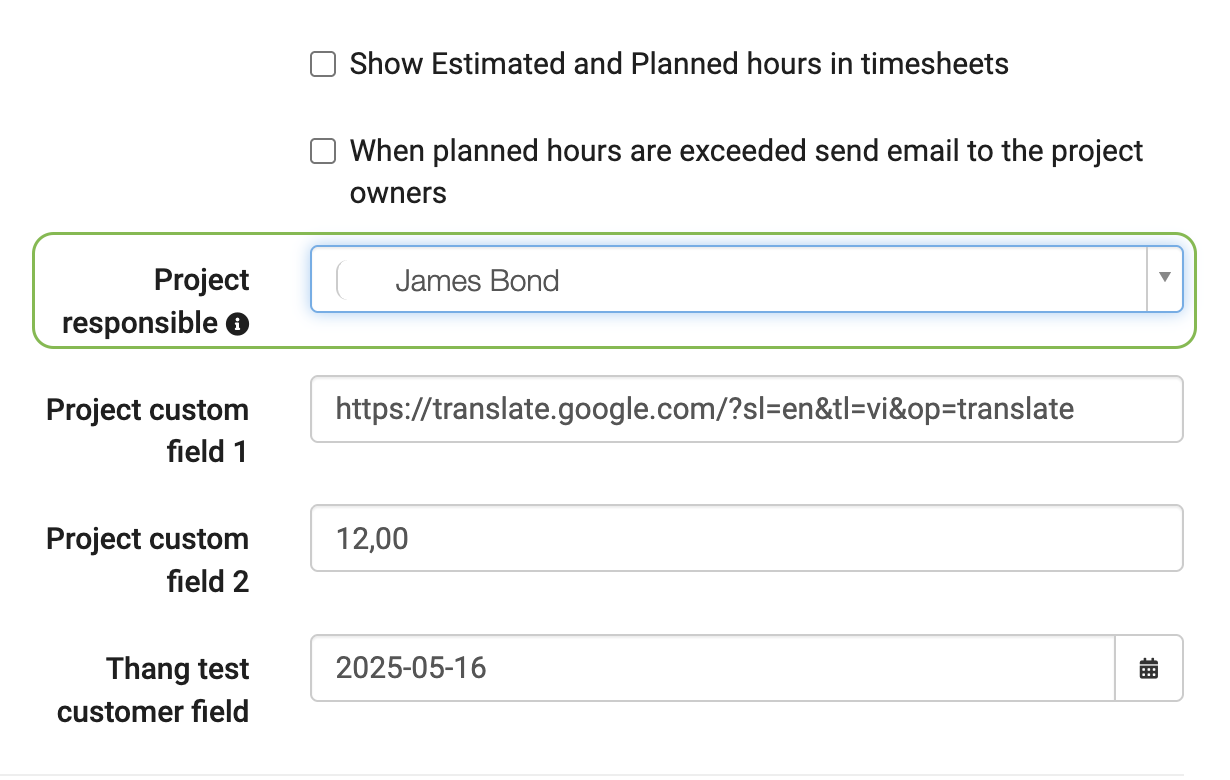
Choose a Project Responsible
Why? When a project has more than one Project Owner, other systems that are connected to Moment only receive one owner, and you could not choose which one.
What's new? In the project details, a new “Project Responsible” drop-down lets you choose which owner is sent to connected systems. The chosen owner is marked with a gold star. The first owner is selected automatically, and if that person is removed or deactivated, the next active owner takes over. For existing projects with several owners, the owner who joined the project first is selected.
Where to find it? Open the project, click Edit on the main page and scroll down until you see the option:
Set the activity number yourself
Why? You may want to decide the activity number yourself, right when you create the activity.
What's new? You can now enter the activity number when you create an activity. Once an activity number is locked, connected systems can't change it.
Where to find it? When you create a new activity.
More control over expense exports to Fortnox
This is only relevant if you export expenses to Fortnox (PAXml).
Why? The export reused the pay type code for the product group field and used a fixed expense pay type code (892), which left little room to match your Fortnox setup.
What's new? You can now enter an “External expense type code” on compensation types, absence types and overtime categories, and in the user preferences for time tracking and flex time. This code is used for the product group (varugrupp) in the export, instead of the pay type code.
The pay type code for expenses (loneart) is no longer fixed. You can now change it under “Export expenses”. It is set to 892, so your current exports stay the same.
Where to find it? In the setup for integration to Fortnox
Bug fixes
These were problems that have now been fixed. The numbers are for reference only.
Reports
- #2046 - External co-workers missing from Absence overview in Excel: External co-workers are now included when you download the Absence overview to Excel.
Invoices
- #2037 - Invoice history settings were swapped: The “Invoiced until now” and “Remaining to be invoiced” settings controlled each other’s lines. Each setting now controls the right line.
- #1995 - Invoice settings for users with project access: Users with full access to a project can now edit invoice settings for activities, additional customers and price models in that project. They no longer need edit permission for the whole company.
Projects and planning
- #2060 - Project plan budget update slowing down Moment: The automatic update of the project plan budget could block users for hours. It now runs in smaller steps, so you can keep working as normal.
Integrations and expenses
- #1894 - Creating expenses from other systems: Expenses created from other systems through iPaaS sometimes failed with an error. This now works as expected.
- #1834 - Deleting an active integration: If you deleted an integration while it was still active, the subscription could stay open. Moment now deactivates the integration before deleting it, so the subscription ends correctly.
- #1074 - Corrected vouchers from PowerOffice Go: When a voucher was corrected in PowerOffice Go, Moment could create duplicate or leftover expenses instead of updating the original. The corrected voucher now replaces the original one.
Other
- #1716 - Tab order in the financial account form: When you pressed Tab, the cursor didn’t follow the order of the fields on screen. It now moves through the fields in the right order, and skips the Category field.
Removed functionality
Nothing has been removed in this release.
Was this article helpful?
That’s Great!
Thank you for your feedback
Sorry! We couldn't be helpful
Thank you for your feedback
Feedback sent
We appreciate your effort and will try to fix the article